CU Boulder Move-In Weekend WiFi Guide (2026)
Move-in weekend at CU Boulder crams unpacking, dorm shopping, and parent goodbyes into a short window on the CU housing calendar — this year that window falls August 16–18, 2026 — and reliable WiFi rarely makes the packing list until a lease e-signature, a family video call, or a course-registration deadline needs it right now. Dorm networks aren't always live the moment you carry the last box in, campus WiFi sees its heaviest concurrent load of the year during move-in, and off-campus students face a separate problem entirely: getting a home connection installed before classes start, not scrambling for one during the first week. This guide covers the three things that actually matter during the move-in window — registering for guest WiFi before you need it, knowing where the reliable fallback is on campus, and timing off-campus internet setup correctly.
Register for CU Guest Before You Arrive
Anyone without a CU login — visiting family, a roommate who hasn't finished enrollment paperwork, a friend helping carry boxes — connects to campus WiFi through CU Guest, which requires a short email registration at a captive portal rather than open access. Credentials arrive within a few minutes of submitting the form, stay valid for seven days, cover up to three devices per person, and require a daily re-login during that window — a detail worth knowing before you assume a Friday registration carries you through Sunday's unpacking without a second login.
The step that trips up the most first-time registrants: the terms-and-conditions checkbox that has to be checked before the Register button activates. If the form loads but the button looks greyed out, that unchecked box is almost always the reason — not a broken form.
The practical move-in-weekend advice: register on cellular data before you're inside a dorm building, not after. Waiting until you're standing in a room with no signal to try to reach the registration page from a network you haven't yet been let onto is a common and avoidable delay. Do it from the car in the parking lot, or the night before from home.
CU students who've completed enrollment use CU Secure instead — a certificate-based credential set up once and valid for roughly two years per sign-in, which is the better long-term option once your CU account is active. Family or friends who hold a login at another participating institution can skip CU Guest entirely and connect through eduroam using their home-institution credentials.
Norlin Library — The Move-In Weekend Fallback
If your dorm's own WiFi isn't active yet, or the network is straining under the concurrent load of an entire freshman class arriving at once, CU Norlin Library at the center of main campus is the most reliable fallback for a stretch of real work: registering for a class, confirming a delivery, or getting a video call with family off without the connection dropping.
Norlin's access-point coverage is dense across the building, and firsthand testing on CU Guest found the connection varies more by seat than by time of day — around 35 Mbps down at the edge of a research-wing corridor, versus roughly 87 Mbps directly under a ceiling access point in the same building, minutes apart on the same network:
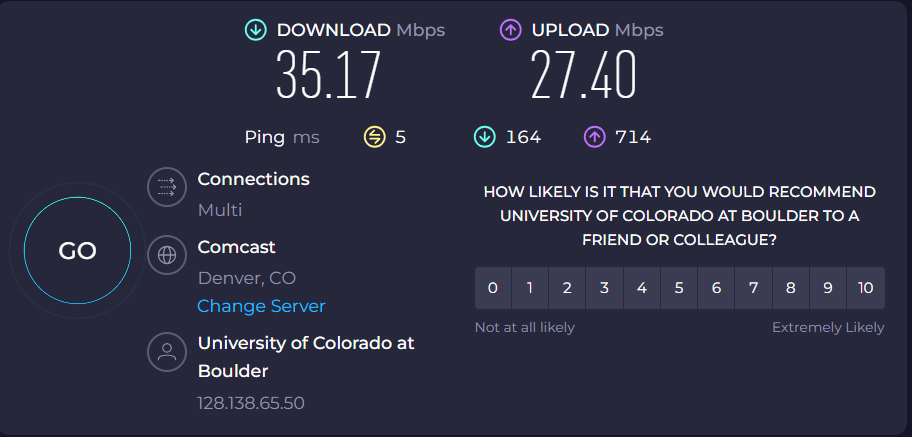
Moving toward a visible ceiling-mounted AP is the single fastest fix if a connection feels slow — no setting on your device does more. Full registration steps and additional speed-test detail live in the CU Guest WiFi guide; Norlin's hours shift with the academic calendar, so check CU Libraries hours before planning a move-in-weekend visit, since summer and fall-start hours differ.
For a quieter, no-registration alternative a short walk south, Boulder Public Library's Main Branch on Canyon Boulevard offers free WiFi to anyone who walks in — no CU login, no email registration, no time limit — useful for a parent handling logistics while a student is still mid-unpack on campus.
Setting Up Off-Campus Before Day One
Students moving into off-campus housing on University Hill or elsewhere near campus face a different move-in-weekend problem: the apartment or rental house needs its own internet service, and installation appointments booked during the move-in rush routinely run days or weeks out. The single most useful move: call or schedule online before the move-in date, not after the truck is unloaded and the lease has already started.
Xfinity

Xfinity serves most Hill-area addresses through its cable plant and is typically the default wired option at off-campus rentals. Installation windows compress hard around the fall semester start, so booking as soon as a lease is signed — even weeks before move-in — is the way to avoid a gap between arrival and having a working connection.
ALLO Fiber

ALLO Fiber has expanded its footprint in Boulder, though availability is address-specific rather than neighborhood-wide. Checking ALLO's coverage tool against your exact off-campus address before move-in weekend — rather than assuming a neighboring building's service — is worth the five minutes it takes.
T-Mobile Home Internet

T-Mobile Home Internet runs on T-Mobile's 5G network with no long-term contract, which suits a student on an academic-year lease who knows the move-out date already. No installation appointment is required in the way a wired service needs one — the equipment ships and self-installs, which can be the faster path if a cable or fiber install window doesn't fit before classes start.
For the full provider comparison, coverage notes, and pricing detail beyond the move-in-specific timing advice above, see the site's off-campus WiFi guide.
Tips for Move-In Weekend WiFi
- Register for CU Guest before you're on campus. Do it on cellular data the night before or from the parking lot — not from inside a dorm room with no signal yet.
- Expect campus WiFi to be busiest during the move-in window itself. An entire incoming class connecting simultaneously strains shared bandwidth; Norlin's dense AP coverage makes it the most dependable seat if your dorm connection is slow to activate.
- Download anything you'll need offline before you arrive. Course materials, forms, and confirmation emails are easier to grab on a home connection than to chase down on a congested move-in-day network.
- Off-campus renters: book installation the day you sign the lease. Fall-semester installation slots fill fastest in the two weeks before classes start — earlier scheduling is the only real lever you control.
- Set up CU Secure as soon as your CU account is active. The two-year credential window means one setup at wifi.colorado.edu covers the whole first year, avoiding repeat CU Guest registrations.
- Know the no-login fallback. Boulder Public Library's Main Branch requires no CU credentials and no email registration — useful for a family member handling errands while a student finishes unpacking.
More Resources
Pair this guide with the CU Guest WiFi registration walkthrough, the University Hill WiFi guide for the off-campus café and home-internet picture in full, and the Boulder library WiFi guide for every no-login fallback in the city. Browse every confirmed spot in the full WiFi directory.
First-party WiFi confirmations are recorded on each linked location page (the wifi_confirmed field); Norlin Library's measured speed reading is documented on its certified location page.
References
- CU Guest — CU Boulder Office of Information Technology — registration process, 7-day credential window, and device limits for campus visitors.
- University Libraries Hours — CU Boulder — Norlin Library seasonal hours for planning a move-in-weekend visit.
- wifi.colorado.edu — CU Boulder OIT — CU Secure setup for enrolled students.
- Boulder Public Library — Locations & Hours — no-login WiFi fallback options near campus.
Posts in this series
- Co-Working vs Coffee Shops in Boulder
- Boulder Parks With Free Public WiFi
- Boulder Public Library WiFi Guide
- CU Boulder Off-Campus WiFi Guide
- Best Spots for Remote Work in Boulder, CO
- Free WiFi in Boulder: Complete Guide
- Best Coffee Shop WiFi in Boulder
- Best WiFi Spots in Downtown Boulder
- Best WiFi Spots in North Boulder (NoBo)
- Best Free WiFi near CU Boulder
- How to Connect to CU Boulder Guest WiFi (2026)
- Best Free WiFi at Twenty Ninth Street Boulder (2026)
- Best WiFi on University Hill (The Hill) in Boulder
- Best Hotel WiFi in Boulder, CO (2026)
- Best WiFi in East Boulder — East Pearl & 30th St
- Free WiFi at Boulder Libraries (2026)
- CU Boulder Move-In Weekend WiFi Guide (2026)
- Back-to-School WiFi Checklist for CU Boulder Students
- Best Brewery and Taproom WiFi in Boulder
- Best Late-Night WiFi in Boulder
- Best Pearl Street Dinner Spot WiFi in Boulder
- Best Quick-Lunch WiFi Spots in Downtown Boulder
- Best International Restaurant WiFi in Downtown Boulder
- Best Brunch WiFi Spots in Boulder
- Best Study-Spot Wi-Fi Near CU Boulder Off Campus: Cafes, Libraries, and Co-Working
- Free Wi-Fi on Pearl Street: Which Cafes, Shops, and Public Spots Actually Have It